Smartphone apps and features that can help blind and low vision users navigate daily life


Receipts. Package labels. Supermarket signs. The challenges of navigating a text-heavy world are constant for those with low vision or vision loss.
While there is a large market for specialized equipment, for many, an important solution is sitting in their pocket or bag: the smartphone. Most people carry a phone that offers powerful tools through simple, accessible apps for blind and visually impaired people.
In fact, many experts consider the smartphone a logical device to support basic tasks from reading labels to navigating unfamiliar spaces. The advent of artificial intelligence (AI), computer-based systems that can accomplish tasks previously done only by humans, has broadened the options to support vision-impaired people.
Several AI-powered features that appear on smart glasses, such as scene description, text recognition and object identification, originated as smartphone apps and are available on mobile devices.
David Simpson, OD, an optometrist and professor of ophthalmology at the University of Colorado Anschutz School of Medicine, specializes in helping patients manage low vision. He sees smartphones as a practical starting point for exploring how to use technology for assistance.
“Being able to provide options in the context of a cellphone that people are already carrying around can be really supportive for patients,” Dr. Simpson said. “It may feel less overwhelming recognizing that they can implement these tools on a device that they already have and feel comfortable and familiar with — and everyone goes around with cellphones. So it’s not something that differentiates people from the rest of the population.”
No app needed: Built-in accessibility features
Whether someone has lived with blindness or low vision for years or is adjusting to recent changes, the first step is to ensure the phone’s built-in accessibility features are enabled to meet their needs. Modern smartphones offer several features that empower people with limited or no vision to navigate and use their phones.
Dr. Simpson finds that many of the patients he works with have taken advantage of basic features like increasing text size on their phones, but may not have tapped into more advanced capabilities such as adjusting color contrast or using the phone’s camera as a magnifier with brightness and color filters.
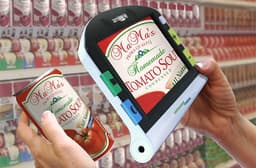
He recommends people use the magnification feature built into smartphones. Dr. Simpson considers it superior to a traditional magnifying glass because it allows adjustment of color, brightness and contrast beyond what a standard lens can.
“If I can help a patient use their cell phone as a low vision device, that’s often a way that we can make an impact, especially in a low-cost way,” he said. Dr. Simpson noted that many free apps for visually impaired users are already available on devices patients own. “A lot of the free apps are great and the features that are built into the phone can be great for assisting patients.”
Most smartphones include a built-in screen reader that speaks aloud written information like messages, app icons and notifications. Users can then navigate the device using voice commands or specific gestures, such as two-, three- and four-finger taps and swipes.
The goal is for the user to access many applications and features without needing to see the screen. It can take some practice, and Dr. Simpson notes the specific taps and gestures take some getting used to. The learning curve can feel steep at first, so he recommends that patients work with an occupational therapist or low vision specialist to learn the gestures. Once the movements become second nature, the results are considerable, he adds.
Using these accessibility features lays the groundwork for users to take advantage of the many third-party apps developed to help the vision-impaired community.
How accessibility apps can support daily tasks
Beyond tools built into phones, there is an effective collection of third-party apps that help with everything from reading text to reaching out to another human who can provide real-time support. Many apps tap into AI to handle a range of tasks that once required specialized tools.
Dr. Simpson encourages patients to explore these tools in a structured way, ideally with the guidance of an occupational therapist or low vision rehabilitation specialist who can help match the right app to a patient’s specific needs and comfort level with technology.
Volunteer-based visual assistance
One of the more common categories of accessibility apps connects blind and low vision users with a volunteer who sees through the device’s camera and describes the user’s surroundings in real time. Services in this space have grown to millions of volunteers with support in over 180 languages.
These services also incorporate AI. Users can take a picture and share it with the app to get a description of what’s in the image, then ask follow-up questions in the same way people enlist voice-to-text on their phones. They can also send images from the phone’s photo gallery or another app directly via the phone’s share feature, getting descriptions without switching apps.
Aaron Preece, editor-in-chief of AccessWorld magazine, a publication of The American Foundation for the Blind, regularly tests accessibility software and hardware. He said the conversational nature of AI recognition is what sets it apart from older tools.
"You can send a picture, get a description, and then ask follow-up questions or send another image from a different angle," Preece said. "That back-and-forth is what makes the AI tools so much more useful than what we had before."
Dr. Simpson noted that the volunteer service is particularly useful for patients who may be less comfortable with AI and prefer the reassurance of a human on the other end. For those patients, knowing a real person is reviewing what the camera sees can build confidence in using the technology more broadly.
AI-powered scene description and object recognition
Several apps act as digital narrators, providing details about someone’s surroundings and recognizing people and objects that the user can train the app to remember. These apps can read printed and handwritten text, scan barcodes to identify products, recognize currency, and describe scenes.
One useful feature lets users teach the app to recognize personal items, such as a purse or wallet. The phone will emit a pinging sound that grows louder as the app detects the object with the camera. Other apps examine a photo from the device’s camera roll and announce its colors or speak the scene description.
Some include a Find mode that can locate common objects and provide direction and distance guidance as the user scans their surroundings with the device’s camera. AI-powered image modes let users take a picture, hear a description and ask follow-up questions.
The detail AI provides compared to older technology is a meaningful step forward, said Preece. Earlier object recognition systems often returned information that the user already knew or identified objects incorrectly. With AI-powered recognition, the descriptions are far more specific and actionable — though people should remain aware that AI can still produce confident but incorrect responses.
Many of these apps are free at a basic level, with more services offered at premium tiers. Dr. Simpson said the low cost is an advantage over dedicated assistive hardware, which can run into thousands of dollars. For people exploring whether technology can help with daily tasks, a free or low-cost app might be the best option.
Apps that use optical character recognition (OCR) and AI are among those Dr. Simpson regularly suggests for patients, and his team’s occupational therapists see success when working with patients on daily tasks.
Cooking is one area where these tools make a practical difference: Rather than stopping to pick up a magnifier, wash hands and read a recipe, a patient can ask an app to read text aloud while they continue their task.
Professional visual interpreter services
Some apps connect users to paid, trained visual interpreters who specialize in working with blind and low vision users. These apps stream a live video from the phone’s camera to the interpreter for assistance with tasks like reading documents, navigating a space or describing surroundings.
These services typically require a paid subscription. However, many universities, airports and government agencies partner with interpreter services to offer them at no cost.
Some interpreter services are expanding beyond phones, offering beta features that connect users with interpreters via video messaging on smart glasses. Others are testing AI-powered visual interpreters that would enable users to have a conversation with an AI agent that can see through the phone’s camera and respond to questions, with a human interpreter available if needed.
Professional interpreter services may be particularly valuable for high-stakes situations, such as navigating an unfamiliar medical facility or reviewing important documents, where a trained human may catch details or context that AI could miss.
Specialty accessibility apps
Unexpected entries are emerging from other industries into the accessibility space. A major cosmetics company offers a voice-enabled makeup assistant app that uses the smartphone's front-facing camera to provide feedback on foundation, eyeshadow or lipstick. The virtual assistant speaks recommendations aloud for areas that need a touch-up and suggests how to adjust one’s look.
These specialty apps from non-technology companies signal a broader recognition that accessibility features can serve a wide consumer base. Experts expect this trend to continue as AI capabilities become easier to integrate into consumer products.
Accessibility features within consumer apps
Popular consumer apps have added features for blind and low vision users. E-reader apps, for example, work with built-in screen readers so users can have text read aloud as they navigate and select options.
Major streaming services have added audio description for much of their catalogs, narrating the visual elements of scenes between dialogue and offering screen readers to support subtitle use. Additionally, popular navigation apps include accessible components in their settings.
Major AI assistants perform many of the functions found in dedicated accessibility apps. They can recognize an image, describe it or engage in a conversation with users through voice mode.
Occupational therapists can help users navigate the offerings within these apps, as the settings for these features are not always easy to locate. Dr. Simpson said that even among patients comfortable with their smartphones, many are unaware how much accessibility functionality is built into the apps they use every day. Working with a specialist can reveal features that make a meaningful difference.
What to know about AI limitations
“I don’t want patients to be misled into thinking that AI is infallible,” Dr. Simpson said. “It’s incredible technology to have, and I think it’s opened up a lot of options for people with low vision. But with any sort of tool for people with vision impairment, there’s always going to be advantages and disadvantages.”
Preece noted that when traditional OCR fails to read something, the errors are usually more obvious. It returns missing characters or garbled text, which makes it clear the technology couldn't translate what it was seeing. However, AI systems can be wrong while sounding sure of themselves, making mistakes harder to catch.
Experts see room for smartphone makers to do more. Dr. Simpson explained that an ideal setup process would detect a visual impairment and guide the user through customization from the start.
"In a perfect world, as you're setting up the cellphone itself, it would be nice if the phone could ask, 'Do you have a visual impairment?'" Dr. Simpson said. "If the patient responds that they do, the phone is able to better guide them and customize that."