Low Vision News and Products
Optelec Introduces New Pocket-Size Video Magnifier
SAN DIEGO, February 2010 A new, pocket-size video magnifier by Optelec makes spot reading quick and easy for low vision users. At only 4.7 ounces, the Optelec Compact Mini is the smallest and lightest portable electronic magnifier on the market, says the company.
With a 3.5" LCD screen, the device can magnify text from 2X to 11X. Different color viewing modes include full color, black on white, white on black, yellow on blue and yellow on black.
Users can operate the magnifier with one hand, using its fingertip controls.
A collapsible reading stand increases functionality for reading and writing.
The device features an automatic battery shutoff for increased battery life and can run for three to four hours of continuous use.
Each new magnifier comes with a wrist strap and protective bag.
The Optelec Compact Mini is available at Optelec dealers and distributors, including eye doctors who specialize in low vision.
Please click here for a closeup photo.
Developing Anti-Collision Eyeglasses for People With Tunnel Vision
BOSTON, October 2009 For people with tunnel vision, collisions with objects and other people outside their central visual field are a constant worry. The potential for trips and dangerous falls is high as well.
Top: The augmented-vision head-mounted display system was studied in a virtual mall environment. Bottom: The person and trash bin that are outside the wearer's tunnel vision are outlined in the center, so a collision can be avoided.Tunnel vision is caused by eye diseases such as glaucoma and retinitis pigmentosa, which gradually erode peripheral vision.
Schepens Eye Research Institute conducted a study of both normally sighted people and tunnel vision patients, who wore a pair of glasses with a transparent computer display, a tiny camera and a small computer.
While wearing the glasses, participants were asked to judge potential collisions while "walking" through a virtual mall displayed on a screen.
The transparent display in the glasses shows not only the scene as it appears naturally in front of someone, but also a superimposed minified outline version of a wider visual field. The computer updates the outline information 30 times per second.
The purpose of the recent study was to determine whether the minified, distorted view that the outline provides is useful enough to help people avoid collisions. Even without adaptation or training, all the study participants were indeed able to make judgments as good as those made while looking at obstacles with natural vision.
Researcher Gang Luo, PhD, said that the next step is to refine the device further and see how well it works in daily life.
Invented by Eli Peli, MSc, OD, the glasses could replace or supplement the long canes that many people with tunnel vision use to search out obstacles in front of them.
The study results were published in the September issue of Investigative Ophthalmology and Visual Science.
Please click here for closeup photos.
Bright Star Can Make Your World Brighter and Clearer
CHERRY HILL, N.J., July 2009 Bright Star LED Portable systems offer combinations of bright, direct, LED light with magnifiers.
The magnifiers come in loupe or clip-on form.
You can wear them clipped to your eyeglasses or safety glasses (the clip-on loupe is shown here); or you can wear them with the available cushioned headband.
The headsets have dual pivot points and an on/off switch.
They are powered by AAA rechargeable batteries or an eight-hour lithium-ion rechargeable battery pack.
The clip-on magnifiers are light in weight and attach to your eyewear with a coated clip; they have a clip-on battery case.
Both loupes and clip-on magnifiers are available in +1.50, +2.00 or +3.00 diopters and are distributed by Tech Optics International.
Please click here for a closeup photo.
New Freedom Machine Offers High Definition With No Glare
ST. LOUIS, April 2009 The newly released Freedom Machine by Vision Technology delivers sophisticated features with unsophisticated usability.
Available in 17- to 26-inch monitors, the Freedom Machine provides High Definition Multimedia Interface (HDMI) technology and a no-glare glass optic system. The 2X to 100X magnification range and auto-focus technology ensure a crisp picture from corner to corner.
Just 1.5 inches above the surface of your desk, the reading table allows you to slide objects onto it smoothly. The control panel features color-coded knobs for simple magnification; and the soft-touch knob, located on the arm, adjusts the monitor's angle for effective ergonomics.
Made of solid-precision-polyurethane, the Freedom Machine is light and durable. Setup is as simple as plugging it in no extra wires or assembly required.
Please click here for a closeup photo of the Freedom Machine.
Desktop Video Magnifier Integrates With School, Office Environments
VISTA, Calif., March 2009 Optelec U.S. has introduced a new-generation desktop video magnifier, the ClearView+G2, which can integrate into home, school or office environments.
Improvements to the basic desktop design include greater ease of use, along with enhanced ergonomics and image quality in the viewing screen. Upgrades also include auto zoom, an extremely flexible arm with both 19 inch and 22 inch configurations and highly flexible turning capability.
Zoom features in the magnifier range from 2.5X to 65X, with high-definition (HD) quality video. Please click here for a closeup photo of the ClearView+G2.
Other new or improved Optelec devices introduced in 2009 include the portable FarView video magnifier, with up to 90X zoom and an autofocus camera with the ability to store up to 100 images. The device weighs only 10.2 ounces and has computer and video screen connections. Please click here for a photo of the FarView video magnifier.
The Optelec ClearNote Portable video magnifier also can connect to video screens and laptop computers. The hand-carried, battery-operated device has up to 18X zoom and contains an auto-adjustment camera as well as remote control. Please click here for a photo of the ClearNote Portable video magnifier.
"Seeing Machine" for Blind Costs Less Than $500
CAMBRIDGE, Mass., January 2009 A portable "seeing machine" developed at MIT transmits simple images directly onto the eye's retina, enabling rudimentary sight for some who are blind or visually impaired.
The portable device can be made for less than $500 and uses technology found in a diagnostic instrument called a scanning laser ophthalmoscope (SLO). A partially blind researcher at MIT's Center for Advanced Visual Studies first encountered the technology when the SLO projected images onto her retina to assess damage from diabetic eye disease.
The researcher, Elizabeth Goldring, described her amazement at being able to see even a written word when the laser-projected image bypassed interior eye bleeding that ordinarily obstructed her sight. At the time, she was blind in both eyes. So she asked that a video of her doctor's face be transmitted through the SLO. And for the first time, she knew what her doctor looked like.
Inspired by the experience, Goldring and colleagues spent the next 20 years developing a portable version of the device that could be attached to outlets such as cameras and computers to transmit images directly to the retina.
Instead of more expensive laser light, the device uses inexpensive light-emitting diodes (LEDs) to project images that are not magnified but contained in a tiny, focused point.
Goldring, who has recovered sight in one eye, said she likes using the device as a camera attachment that lets her blind eye see images being photographed.
"I feel I'm able to express myself visually with my blind eye, and there's value in that," Goldring said.
Acrobat LCD Includes Video Magnifier
HUNTINGTON BEACH, Calif., December 2008 Seven viewing modes provide exceptional versatility to users of the Acrobat LCD, which includes a video magnifier and computer screen.
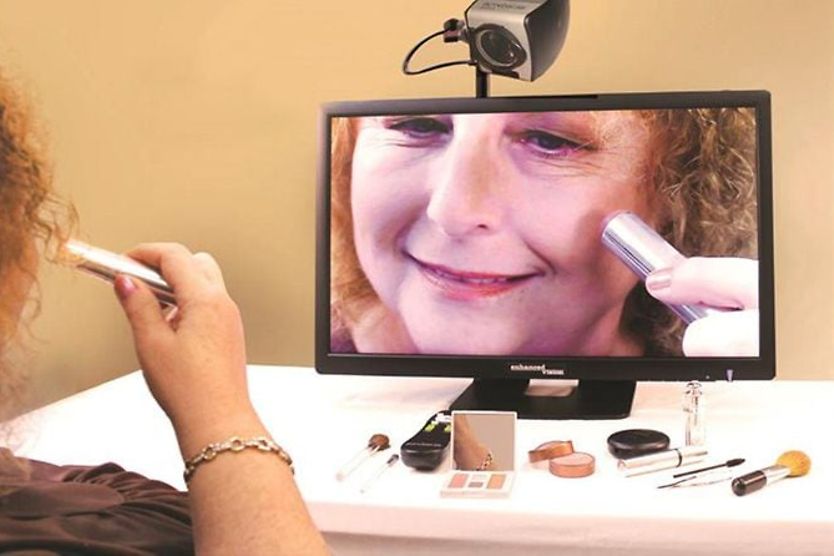
As part of the system, a detachable camera that rotates 340 degrees in any direction sits on a "swivel" arm atop a 19-inch video monitor.
You can rotate the camera to focus on any object you want magnified, including your face for activities such as applying makeup.

Features include:
- Automatic focus on the targeted object.
- "Memory" settings for each mode used.
- Magnification capability of up to 65x.
- Dual keypad with easy access to controls.
You can also order accessories, including a remote control and rolling carrying case.
The Acrobat LCD has a two-year warranty and is manufactured by Enhanced Vision, Inc.
Cocoons Lenses Improve Contrast Vision
SAN LUIS OBISPO, Calif., September 2008 Live Eyewear has introduced four lens tints specifically designed to help improve contrast and visual acuity for people with low vision. Worn over regular prescription eyeglasses, these Low Vision Cocoons are available in six sizes from small to extra large aviator styles all with black frames.
Four tints specifically aimed at improving low vision include boysenberry to help reduce glare, hazelnut to heighten contrast vision both indoors and outdoors, lemon to maximize brightness and improve visual acuity and orange to intensify backgrounds and improve clarity of objects seen.
Some lens tints also provide protection against potentially damaging blue light, with hazelnut blocking 98 percent, lemon 40 percent and orange 100 percent.
All Cocoons lenses provide 100 percent UV protection and have a one-year scratch-resistance warranty. These non-polarized lenses are made of distortion-free, durable polycarbonate.
Please click here for closeup photos of this line.
Experimental "Telescopic" Eyeglass Lenses May
Help Drivers With Low Vision
BOSTON, July 2008 "Telescopic" eyeglass lenses that provide simultaneous views of both normal and magnified roadway scenes could benefit drivers with low vision, according to researchers at Schepens Eye Research Institute (Harvard) and the University of Murcia in Spain.

A new design for telescopic eyeglass lenses provides a rectangular view above the normal view (right). Old designs (left) create a circular "blind spot" that obscures normal vision. This new telescopic design is embedded in lenses, so the eyeglasses look better on wearers. (Photos provided by Eli Peli, OD, of Schepens Eye Research Institute.)
A paper published in the May/June issue of Journal of Biomedical Optics describes refinements to telescopic eyeglasses that make them more cosmetically appealing as well as functional.
These lenses provide a magnified, rectangular field of view that is safely displayed above the normal view. This approach avoids creating a round "blind spot" (scotoma) associated with other telescopic designs, as shown in the illustration.
The "in-the-lens" telescopic feature in these spectacles uses an embedded mirror and "curved" or conventional lenses to help provide and display magnification.
Researchers say this design lends itself to mass production, with magnification built into the lens along with the wearer's usual eyeglass prescription.
Please click here for a closeup photo.
Needle-Free Eye Drug Delivery System Introduced
SYDNEY, Australia, June 2008 Seagull Technology has announced a new, needle-free method of delivering drugs to the inner back of the eye for treatment of eye diseases such as macular degeneration and diabetic retinopathy.
The handheld device operates by using ultrasound waves to help drugs penetrate the outer layers of the eye to reach interior structures such as the retina.
A gel and local anesthetic are used before the device is applied, making it feel about the same as wearing a contact lens while the drug is delivered to the eye's interior.
Company officials say the device potentially could replace current systems of drug delivery using needles and eye injections, which can be painful and involve risk of complications.
More than 200,000 U.S. residents and 20,000 Australian residents now have advanced and potentially blinding forms of macular degeneration typically treated with eye injections, according to the company.
The device proposed as a replacement for needle-based injections was introduced at the June Bio2008 International Convention in San Diego.
Please click here for a closeup photo.
Speed Reading Computer Software May Assist
People With Low Vision
FORT COLLINS, Colo., April 2008 Computer software specifically designed to enhance reading for people with low vision is being developed through use of RapidReader technology under an arrangement between SoftOlogy IdeaWorks and Ensight Low Vision Skills Center.
With speed reading technology, large-sized letters forming words appear on the computer screen at a pace that matches the rhythm of human speech.
These words can be adjusted to show up more rapidly or slowly, according to the comfort level of the person doing the reading.
Company officials say that people with low vision often must stop or hesitate to read or re-read words through a magnifier.
But with the RapidReader, words on a computer screen are more easily seen and comprehended because eyes can stay fixed on one point.
Please click here for a closeup photo.
Optelec U.S. Introduces Clearview+ 22-Inch Widescreen
Electronic Video Magnifier
VISTA, Calif., March 2008 Optelec U.S. low vision products now include the Clearview+ 22-Inch Widescreen Electronic Video Magnifier, with one-button technology that can increase or decrease magnification, as well as switch from text to photo mode.
Optelec's new 22-inch widescreen joins the existing ClearView+ line of 17-inch and 19-inch CRT and TFT displays. Unique screen technology offers a choice of four different displays, including ability to view images in black and white, blue and yellow, black and yellow and their reverse modes.
For people on the go, Optelec also offers the Compact+ Handheld Electronic Magnifier, which can fit into a purse, backpack or pocket.
The Compact+ offers up to 10 times magnification of images that are displayed on a 4.3-inch widescreen.
A carrying case also is included with the Compact+, which has a three-hour rechargeable battery and weighs less than 10 ounces.
For closeup photos:
Please click here for the Clearview+ 22-Inch Widescreen Electronic Video Magnifier.
Please click here for the Compact+ Handheld Magnifier.
Device Provides Higher Contrast Television Viewing
for People With Low Vision

A new device provides high contrast television images for people with low vision. (Photos: Schepens Eye Research Institute)
BOSTON, January 2008 Schepens Eye Research Institute low vision expert Eli Peli, OD, and colleagues have invented a type of "decoder" that increases contrast on a digital television screen to enhance images for people with impaired vision.
"The technology we created is quite simple and can easily and cheaply be incorporated into even the newest technologies for television and Internet video," said Peli, who is working with Analog Devices Inc. on a prototype for commercial use.
During testing of the device, scientists said that even subjects with normal vision preferred higher contrast television screen images enhanced by the new technology.
Blind Students Can Now Use Smartpen and Paper
NASHVILLE, December 2007 New smartpen and paper technology has been introduced to help blind students recognize graphs and figures needed for studying subjects such as physics, calculus and biology. Livescribe smartpens are expected to be available for purchase in early 2008.
Smartpens can recognize and convert handwritten or printed markings into "raised" patterns on paper, which then are identifiable by touch. The technology also enables students to hear audio explanations of a diagram or drawing touched by the smartpen, which has a camera in its tip.
The National Science Foundation awarded a $300,000 grant to Vanderbilt University researchers to investigate ways to apply the new smartpen technology.
For closeup photos, please click here.

Smartpen technology can be used to help blind students recognize drawings and graphs needed for studying subjects such as physics and calculus.
Implant for Retinitis Pigmentosa
SYLMAR, Calif., February 2007 An artificial retina that might restore at least some sight to people blinded by retinitis pigmentosa has received FDA clearance to undergo clinical trials.
The device, known as the Argus II Retinal Prosthesis System, was developed by Second Sight Medical Products and has been used in early human testing at the University of Southern California's Doheny Eye Institute.
University researchers say six previously blind retinitis pigmentosa patients who received the first generation version of the retinal implant now are able to see light, identify objects, and detect motion. The device includes an attachment to the retina, external camera, and a video processing unit.

Clinical trials will begin soon for an artificial retina, known as the Argus II Retinal Prosthesis System. (Images courtesy of Second Sight Medical Products of Sylmar, Calif.)
The LazLight High Performance Reading Lamp
Aging eyes need more light, and the LazLight delivers it, with the power of 700-foot candles of pure, intense, glare-free white light.
That's 350 percent more light than the nationally advertised 27-watt fluorescent reading lamp, but without any eye-damaging blue light radiation, according to Ronald Lazarus, the inventor. He adds that the LazLight reading lamp is the brightest available, delivering high contrast and true color.
The lamp is compact but heavy-duty and has a full-range dimmer. A full 12-month warranty includes parts, labor, and the 4,000-hour bulb.
You can order LazLight on the self-named website, which also contains testimonials from users, including George Bisbikos, Director of The Learning Center for Vision Impaired Seniors of Broward County, Florida.
LazLight is available from other sources, too, including the Levenger "Tools for Serious Readers" catalog, where it is called the "Sheherazade." The manufacturer is based in Weston, Florida. Click here for closeup.
FlipperPanel: the Newest Addition to the Flipper Family
The FlipperPanel is a slim LCD panel that displays images captured by the Flipper autofocus camera.
The screen can magnify from 2x to 22x and is adjustable with a knob.
The unit runs up to five hours on a battery pack without recharging. You just point the Flipper camera at any object and view it on the LCD screen in one of four viewing modes (photo, negative, standard, positive).
Click on photo to see the entire Flipper family of digital magnification products.
28 Color Combinations Increase Reading and Viewing Comfort
The Merlin Color Select is a desktop video magnifier that offers you 28 color combinations for reading and viewing. Just browse through the color combinations onscreen, then set the viewing modes that best meet your individual needs.
You can also choose among three pre-programmed modes and four standard modes: full color, photo mode, enhanced white on black, and black on white. You press buttons on the front of the unit to switch between these modes.
Voice activation is also available as an optional feature.
The Merlin Color Select has a large reading table to accommodate large books, maps, and other oversize materials. The unit is made by Enhanced Vision. Click on photo for more views.
Compact Video Magnifier for When You're on the Go
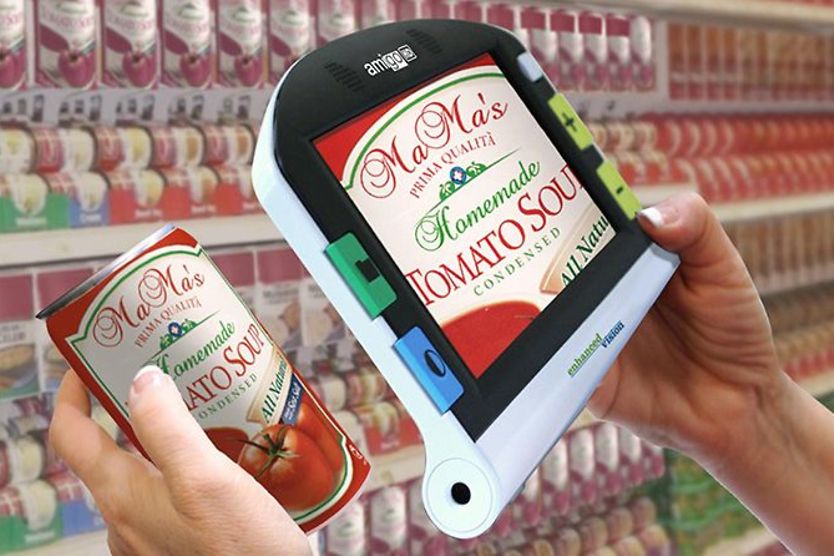
Just six inches wide and a little more than one inch thick, the Pico compact video magnifier lets you read and write more easily when you're out and about. The unit weighs just 10 ounces, but it has a color display that lets you read restaurant menus, grocery labels, and receipts at 5x magnification.
If you prefer, you can also use the negative viewing mode (white letters on black background). Image brightness is adjustable.
Pico has an integrated battery that can be recharged with a car adapter when you're away from home. A carrying case is included. Pico is made by Telesensory. Click on photo for close-up.
Voice-Activated Software Allows the Visually Impaired
to Access the Internet, E-mail
Tell your computer what to do ... literally. A new software program called SoundAdvice (click on the photo for a close-up) takes voice commands and within seconds, retrieves information from your computer files, the Internet or your e-mail. It then reads you the information in a natural, human voice.
Internet files come from a preprogrammed database of websites that cover topics including news, business, sports, movies, weather and nutrition. You can also look up resources, activities and services for the visually impaired, as well as access phone directories, a dictionary, an encyclopedia and a thesaurus.
Installation is easy, because SoundAdvice comes on a CD. Once you install it, you train SoundAdvice to recognize your voice by saying a few sentences into the included microphone headset, then select which voice SoundAdvice should use to read your information to you.
SoundAdvice works with Windows 2000 and XP, and requires an 800 MHz processor and 256 MB of RAM. You can purchase the system at the Telesensory website or your local Telesensory distributor.
The Olympia: Portability and More
Having trouble reading menus, or the small print on food labels and prescription bottles?
A new portable magnification system from Telesensory can lend a hand. Called the Olympia, this lightweight device magnifies text and pictures up to 26 times.
The Olympia can magnify what you're writing as well: it has a folding writing stand with 4.75 inches of clearance underneath the magnifier.
The Olympia features a tilted screen so using it is easy on your neck, plus glare and brightness controls that you can adjust for your comfort level.
You may choose from three modes: full color, white letters on a black background or black letters on a white background.
You can also connect the Olympia to your television if you prefer a larger screen; using the television magnifies text and pictures up to 76 times.
To find a local distributor, contact Telesensory through their website. 
Read more about living with low vision.
[Page updated February 16, 2010]
Introduction |
Aids for Computer Use |


Reproduction of any images or text from this website is prohibited by copyright law.